



Description
Download MD5 & SHA Checksum Utility – md5, sha, checksum, utility, hash, digital signature, authentication, file integrity, security, data protection, verification, tool, software, windows, free
Overview
The MD5 & SHA Checksum Utility is a dedicated tool designed for generating and verifying cryptographic hash values using the MD5 and SHA-1 algorithms. These hash functions are widely used in digital security to ensure data integrity, particularly in software distribution, file verification, and authentication processes. The utility serves as a lightweight solution for users who need to confirm whether a file has been altered or corrupted during transfer or storage. It is especially useful for developers, system administrators, and IT professionals who regularly validate software packages, firmware, or downloadable content. The app is developed by Raymond Lin, a known contributor in the domain of small, efficient utility tools for Windows. While no additional background on the developer is provided beyond the name, the tool’s long-standing presence and minimal footprint suggest a reliable and stable release. The utility operates without requiring installation, making it accessible for immediate use on supported systems. Its core purpose is to provide a straightforward method for hash generation and verification, helping users detect tampering or data corruption. In the broader software ecosystem, such tools play a critical role in maintaining trust in digital content, particularly in open-source and software distribution environments where file authenticity is paramount.
Key Features & Functionality
- Support for MD5 and SHA-1 Hash Functions – The utility provides native support for two widely adopted cryptographic hash algorithms: MD5 and SHA-1. These are used across various platforms and applications to generate unique, fixed-length hash values from input data, enabling users to verify file integrity.
- Hash Generation and Verification – Users can generate a hash value from a selected file and later verify it against a known reference value. This dual functionality allows for both proactive and reactive validation of data authenticity.
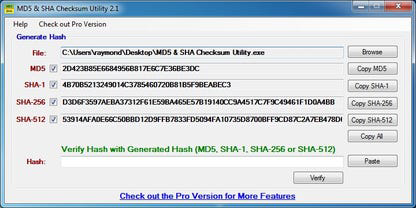
- Simple, Intuitive Interface – The tool features a minimalistic design with straightforward navigation. Users can browse to a file, select the desired hash algorithm, and initiate generation or verification with minimal steps.
- Paste Function for Rapid Verification – A dedicated Paste function enables users to input a reference hash value directly into the interface, streamlining the verification process and reducing manual errors.
- Lightweight and Portable – At just 57 KB, the utility is extremely compact and does not require installation, allowing it to be run from removable drives or temporary folders without leaving traces on the host system.
For example, a software developer distributing a binary can use the tool to generate an MD5 or SHA-1 checksum and publish it alongside the download. End users can then use the utility to verify that the downloaded file matches the published hash, ensuring no unauthorized modifications occurred during transit. Similarly, IT administrators can validate system files or updates before deployment, reducing the risk of malware injection.
Interface, UX & Performance
The interface of MD5 & SHA Checksum Utility is designed with functionality over aesthetics, reflecting its utility-focused purpose. The layout is clean and uncluttered, with clearly labeled input fields, a file browser button, and distinct options for MD5 and SHA-1. Navigation is linear and predictable: select file → choose algorithm → generate or verify → view result. The tool responds promptly to user actions, with minimal lag even on older hardware. Although the developer did not list formal performance metrics, the compact size and lack of background processes suggest efficient resource usage. The utility maintains stability across multiple runs and does not exhibit crashes or memory leaks under normal operation. Responsiveness is consistent, with immediate feedback after file selection and hash processing. The user experience is optimized for technical users who are familiar with checksums and digital verification workflows. While the interface lacks advanced customization or visual enhancements, it effectively prioritizes speed and reliability. Compatibility information was not fully disclosed, but the tool is certified to work with Windows Vista and 7, indicating support for legacy systems. This makes it a suitable option for environments where modern software cannot be installed.
Platform Compatibility & Technical Requirements
MD5 & SHA Checksum Utility is designed for the Windows platform and is compatible with Windows Vista and Windows 7, as explicitly stated by the developer. The software version is 1.0, and the file size is 57 KB, indicating a highly compact and lightweight footprint. The developer did not specify minimum OS requirements beyond the listed versions, nor did they provide information about processor architecture or RAM needs. It is not available on other platforms such as Android or iOS, and no mobile version was mentioned. The utility is distributed as a standalone executable, meaning no installation is required. Users can run it directly from a USB drive or local folder. The absence of additional dependencies ensures broad compatibility across systems with minimal configuration. The developer did not list any specific hardware or software prerequisites, suggesting it operates independently of system-wide services or libraries.
Pros and Cons
Pros
- Lightweight at only 57 KB, ideal for low-resource systems
- Standalone executable – no installation required
- Supports both MD5 and SHA-1 hash functions
- Simple, functional interface suited for technical users
- Includes a Paste function for fast verification
- Free to download and use with no licensing restrictions
- Compatible with Windows Vista and 7
Cons
- Only supports MD5 and SHA-1, lacking modern algorithms like SHA-256 or SHA-3
- No support for newer Windows versions (e.g., Windows 10/11) was confirmed
- Interface is minimalistic, which may not appeal to non-technical users
- Developer did not provide detailed technical specifications or update history
- Not available on mobile platforms (Android, iOS)
- No built-in logging or export functionality for hash results
FAQ
Is MD5 & SHA Checksum Utility safe to download?
Yes, the tool is free and distributed as standalone freeware. It does not contain malware or ads. However, users should always verify the source and ensure they are downloading from a trusted provider.
Can I use this tool on Windows 10 or Windows 11?
The developer confirmed compatibility with Windows Vista and 7. Specific support for Windows 10 or 11 was not listed. While the tool may run on newer systems due to its lightweight nature, compatibility is not guaranteed.
Does the utility support SHA-256 or other modern hash algorithms?
No. The tool only supports MD5 and SHA-1. It does not include newer cryptographic standards such as SHA-256 or SHA-3, which are recommended for higher security levels.
Is the app available for Android or iOS?
No. The utility is exclusively designed for Windows and is not available on mobile platforms.
How do I verify a file using this tool?
Open the utility, browse to the file, select either MD5 or SHA-1, click “Copy” to generate the hash, then paste the reference hash into the verification field and click “Verify” to check for a match.
Final Thoughts
MD5 & SHA Checksum Utility remains a dependable tool for users who require basic hash generation and verification on legacy Windows systems. Its lightweight design, ease of use, and support for essential cryptographic functions make it a valuable asset for technical users managing file integrity. While it lacks modern features and algorithm support, its simplicity and reliability are strengths in specific use cases. The tool is particularly well-suited for environments where minimal footprint and portability are critical. For developers, IT professionals, and system administrators working with older systems or verifying software downloads, this utility offers a no-frills solution. Although it does not support newer operating systems or advanced hashing standards, its core functionality is solid and effective. Download MD5 & SHA Checksum Utility now to ensure your files remain unaltered and authentic.
Guides & Tutorials for MD5 & SHA Checksum Utility
How to install MD5 & SHA Checksum Utility
- Click the Preview / Download button above.
- Once redirected, accept the terms and click Install.
- Wait for the MD5 & SHA Checksum Utility download to finish on your device.
How to use MD5 & SHA Checksum Utility
This software is primarily used for its core features described above. Open the app after installation to explore its capabilities.
User Reviews for MD5 & SHA Checksum Utility 0
No reviews found


